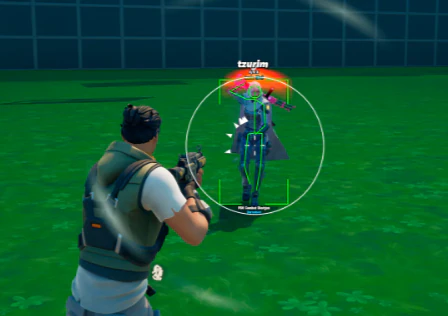
Fortnite ESP Guide: Box ESP, Skeleton ESP, Health ESP, Player Radar & Loot Visibility
A complete Fortnite ESP guide covering box ESP, skeleton ESP, health ESP, player radar, bot radar and category-based loot visibility.
Fortnite ESP is an overlay that turns hidden game information into a readable visual layer. Depending on the mode, it can show player boxes, skeletons, health values, radar positions, bots, chests and other loot categories.
This guide explains the five main Fortnite ESP features, what each one displays, and when a player-focused overlay differs from a radar or loot-focused view. For a wider overview of Fortnite/">https://fnhacks.net/">Fortnite hacks, see the main product hub after reviewing the technical details.
Fortnite ESP feature comparison
| Feature | What it displays | Primary use |
|---|---|---|
| Box ESP | 2D boxes around players or bots | Fast target identification |
| Skeleton ESP | Bone and joint lines inside a model | Body position and movement |
| Health ESP | Health, shield and distance values | Threat priority and engagement timing |
| Player and bot radar | Nearby entity markers on a radar view | Rotation and off-screen awareness |
| Loot ESP | Chests, weapons, ammo and item categories | Loot routing and inventory planning |
Box ESP: fast player outlines
Box ESP draws a rectangle around a player or bot. The box usually follows the entity on screen and can be paired with a name, distance, team color or visibility indicator.
The main advantage is speed. A box is easier to scan than a detailed model overlay, so it works well when several players appear at once. It shows where a target is, but it does not describe body orientation as precisely as skeleton ESP. Players comparing visibility tools can review the Fortnite ESP product features before choosing a setup.
Skeleton ESP: body position and movement
Skeleton ESP connects bones or joints with lines inside the player model. This can show whether a target is standing, crouching, jumping, facing away or moving behind a build.
Skeleton lines provide more context than a simple box, but they can look busy in crowded fights. Many configurations use skeleton ESP at a shorter distance while keeping boxes available for long-range scanning.
Health ESP: target priority
Health ESP adds health and shield values to the player overlay. Some layouts also show distance, knocked state, team state or a color that changes as a target loses shield and health.
Health information helps with decision-making. A low-health target may be a quick finish, while a fully shielded player may require a different angle or more careful timing. Health ESP complements boxes and skeletons rather than replacing them.
Player and bot radar
A radar is different from screen-based player ESP. Instead of drawing information directly around a visible model, it places nearby players or bots on a separate top-down or circular location display.
Radar is useful for rotations, third-party detection and off-screen awareness. It can show the direction and approximate distance of an entity even when that entity is outside the current camera view. Radar does not usually provide the same body or health detail as player-focused ESP.
Loot ESP and category visibility
Loot ESP focuses on the map rather than player entities. It can mark chests, floor loot, ammo, weapons, consumables, rare items, reboot vans and supply drops.
Category filters keep the overlay readable. A player may show only chests while landing, then switch to weapons, healing items or high-value drops during a rotation. Loot ESP is about route planning and item visibility, not combat tracking.
Player-focused ESP vs radar vs loot visibility
Player-focused ESP answers “who is here and what are they doing?” Boxes, skeletons and health values are attached to player models. Radar answers “where are nearby entities?” Loot visibility answers “what useful items are nearby?”
These layers can work together, but each has a different information density. A clean setup normally uses boxes or skeletons for close fights, radar for rotations, and filtered loot markers for the early and mid game.
Choosing an ESP layout
- Use boxes for a simple scan of crowded fights.
- Use skeletons when body direction and movement matter.
- Add health values when target priority is important.
- Use radar for rotations and off-screen player awareness.
- Filter loot by category so markers do not cover the play space.
Fortnite ESP FAQ
What is the difference between box ESP and skeleton ESP?
Box ESP outlines the target with a rectangle. Skeleton ESP draws the model joints and gives more information about body position and movement.
Does health ESP replace player ESP?
No. Health ESP is an information layer usually attached to player ESP. It adds shield, health or state values to an existing box, skeleton or name display.
What does player radar show?
Player radar shows nearby players or bots as markers on a separate location display. It is mainly used for direction, distance and rotation awareness rather than detailed body information.
Can loot ESP be filtered?
Yes. Category filters can limit visibility to items such as chests, weapons, ammo, healing items or rare drops. Filtering reduces clutter and makes the overlay easier to read.
Which Fortnite ESP feature should I learn first?
Start with box ESP because it is easy to scan. Add health, skeleton, radar and loot categories one at a time so you can understand what each layer contributes.